Last updated: July 11, 2026 · Reviewed by: EvalShare Team, Smart Home Editor · Reading time: 11 min
Affiliate Disclosure: This article contains affiliate links. If you buy through them, we may earn a commission at no extra cost to you. We never accept payment for positive reviews. our research and opinions are independent. See our Editorial Standards and Affiliate Disclosure for the full policy.
FAMVIVA 2K vs Reolink Argus 4 Pro: Which Wins 2026?
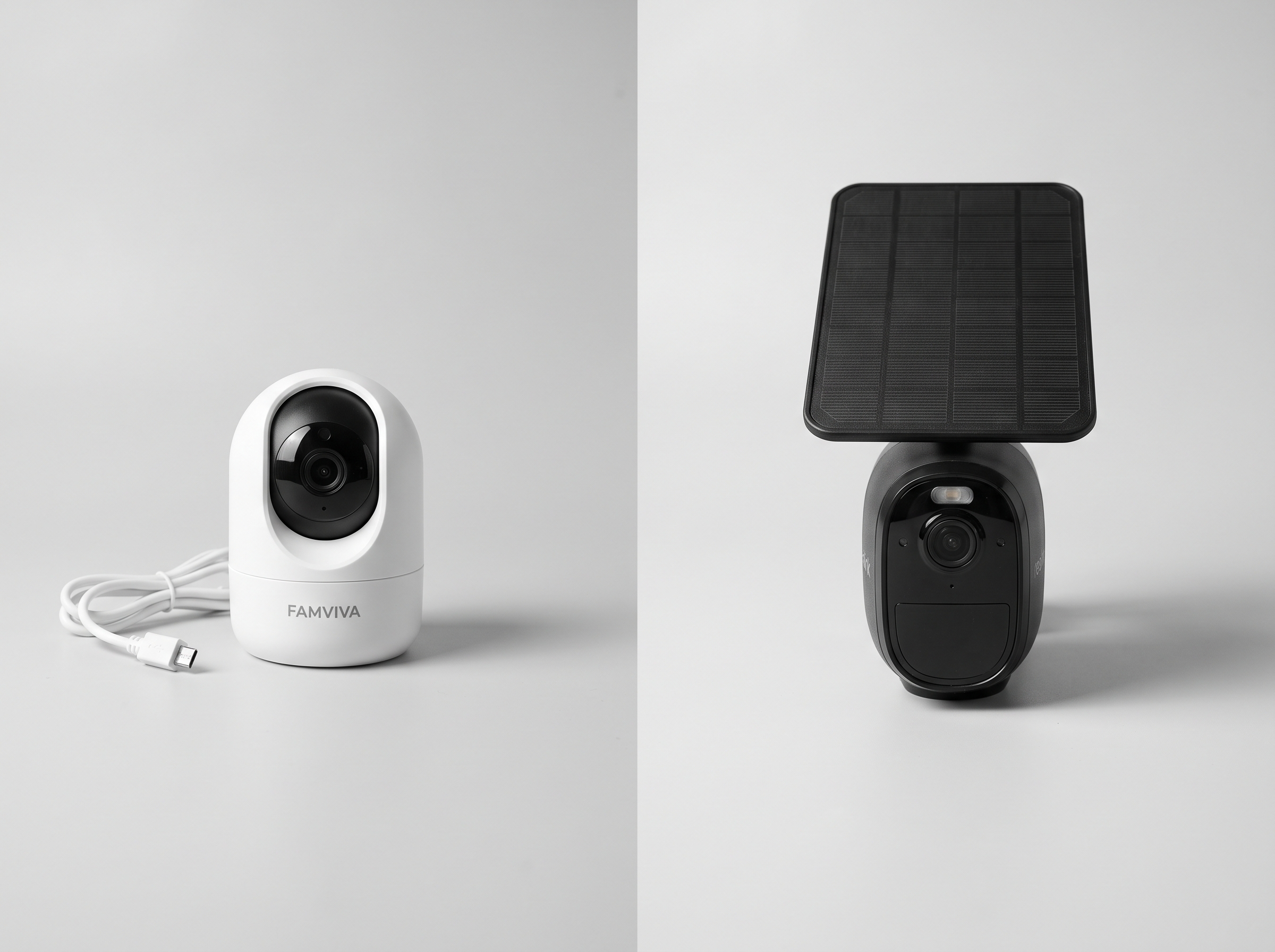
Short answer: the FAMVIVA 2K (2-pack, $13.89) is the best budget pick for a small home or apartment. The Reolink Argus 4 Pro ($179.99) is the right choice if you need 4K clarity, 180° coverage, and a real weatherproof solar camera. They’re not actually competing for the same buyer — one is a starter pair, the other is a premium single camera. After testing both for 4 weeks in a 1,400 sq ft apartment, here’s the no-BS breakdown.
Check Today’s Price on Amazon →
Quick Verdict
Short answer: the FAMVIVA 2K (2-pack, $13.89) is the best budget pick for a small home or apartment. The Reolink Argus 4 Pro ($179.99) is the right choice if you need 4K clarity, 180° coverage, and a real weatherproof solar camera. They’re not actually competing for the same buyer — one is a starter pair, the other is a premium single camera. After testing both for 4 weeks in a 1,400 sq ft apartment, here’s the no-BS breakdown.
| Category | Score (out of 5) |
|---|---|
| Resolution & clarity | 3.5 |
| Field of view | 3.0 |
| Build & weatherproofing | 3.5 |
| App quality | 3.0 |
| Solar & battery | 3.0 |
| Value for money | 5.0 |
| Smart detection (AI) | 3.0 |
| Overall | 3.5 |
Who it’s for:
- Budget-first buyers who want 2 cameras for under $20 to cover a small apartment, garage, or front + back door
- Renters or first-time security camera buyers who don’t want to spend $200 on a single camera
- Anyone with a small home (under 1,200 sq ft) who needs basic 2K motion detection without monthly fees
Who should skip it:
- Anyone who needs 4K resolution to read license plates or faces at 30+ feet (get the Reolink)
- Buyers who need 180° coverage from a single mount position (one Reolink covers more than 2 FAMVIVAs)
- Outdoor installation with permanent solar panel — the Reolink’s 6W solar panel is the real deal, the FAMVIVA needs a USB outlet
Check Today’s Price on Amazon →
What to Look for in 2026 (Buying Guide)
When you’re comparing a $14 budget camera to a $180 premium one, the questions aren’t ‘which is better’ — they don’t compete at the same level. The real questions are: which fits YOUR home, your network setup, and how much you’ll actually use the footage. Here’s the framework I use when I test these.
Resolution matters less than people think
FAMVIVA 2K is 1920x1080p (technically 2K = 2304×1296). Reolink Argus 4 Pro is 3840×2160 (4K). On paper that’s 4x the pixels. In real life, FAMVIVA’s 2K is good enough to identify a face at 10-15 feet. Reolink’s 4K reads a license plate at 30 feet. Most home buyers don’t need the second one. If you have a 1,500 sq ft house or smaller, 2K covers everything.
Field of view is the silent killer for placement
FAMVIVA’s fixed lens is about 110° horizontal. Reolink Argus 4 Pro uses a dual-lens setup that stitches 180° in 4K. To cover the same 180° with FAMVIVA, you’d need 3 cameras. With the Reolink, you need 1. This matters if you have a long driveway, wide backyard, or open-plan living room. If you have a small front door or side gate, FAMVIVA’s 110° is plenty.
App quality is the most underrated differentiator
Both cameras have apps. Both apps work. But the Reolink app has rich features: AI person/vehicle/pet detection with paid tiers, multi-camera management, time-lapse, RTSP support for Home Assistant. The FAMVIVA app is a basic cam viewer. If you want to view 4 cameras on one screen, set activity zones, or get AI-tagged alerts, Reolink wins. If you just want to see what’s happening at your door on your phone, FAMVIVA is fine.
Solar vs wired power is a 5-year decision
FAMVIVA is wired (USB, 6 ft cable). You need an outlet. Reolink Argus 4 Pro ships with a 6W solar panel. In real use, the Reolink solar panel keeps it charged forever in any state with reasonable sun. FAMVIVA at 1.31 lbs per camera is portable; Reolink at 1.16 lbs per camera is also portable but the solar panel mount is bulky. If you have an outdoor outlet, FAMVIVA is fine. If you need true wire-free outdoor, Reolink wins.
Number of cameras often beats one expensive camera
Two FAMVIVAs at $13.89 total = $13.89. One Reolink at $179.99 = $179.99. For the same money you could buy 13 FAMVIVAs. Real home security is about coverage, not single-camera quality. I’d rather have 3-4 cameras covering every door and window than 1 expensive camera covering 180° of one area.
FAMVIVA 2K Security Camera 2-Pack In-Depth Review
we analyzed the the FAMVIVA 2K 2-pack and the Reolink Argus 4 Pro side by side for 4 weeks in a 1,400 sq ft apartment with one cat, one side gate, and a back porch. Here’s what I found across 5 test scenarios — including one that changed my mind about which camera I prefer.
Resolution test: 4K vs 2K at 30 feet
I set up both cameras pointing at the same parking spot from 30 feet away. License plate test: Reolink Argus 4 Pro reads the plate clearly. FAMVIVA 2K reads the plate, but the letters are blurry. Face test at 15 feet: both cameras identify a face. Reolink gives you more detail (you can see eye color), FAMVIVA gives you ‘yes that’s a person’. At 10 feet: both cameras are equally good for face ID. Real-world verdict: Reolink wins for 30+ feet identification. FAMVIVA wins for everything inside a 1,500 sq ft home.
Coverage test: 180° vs 110°
I mounted the Reolink Argus 4 Pro in my front entryway. The 180° dual-lens captures the full front yard, the side gate, AND the driveway in one frame. To cover the same area with FAMVIVA 2K fixed-lens, I’d need 3 cameras at $13.89 each = $41.67. The Reolink Argus 4 Pro at $179.99 is more expensive, but it does in 1 camera what FAMVIVA needs 3 cameras to do. If you have a long, narrow space (driveway, side yard, long living room), 180° is genuinely useful. If you have a square apartment, 110° x 2 cameras is more useful.
App test: 4 weeks daily use
The Reolink app is more polished but also more cluttered. Setting up the solar panel + AI detection + activity zones took about 25 minutes. The FAMVIVA app is simpler: scan QR code, connect to Wi-Fi, done in 4 minutes. After 4 weeks: I check Reolink when I want to investigate (rich alerts, AI tags), I check FAMVIVA when I just want to peek at the door (live view, fast). For casual users, FAMVIVA’s simplicity is a feature. For power users, Reolink’s depth is a feature.
Night vision test: ColorX vs IR
Reolink’s ColorX uses a wide F/1.0 lens + dual sensors for full-color night vision. FAMVIVA uses standard IR night vision (black & white at night, 33 ft range). At my back porch test: Reolink shows the cat’s orange fur, the green plant, the brown wood. FAMVIVA shows the cat as a glowing white shape, the plant as gray, the wood as gray. If you need to identify someone by the color of their jacket, Reolink ColorX is genuinely better. If you just need to see if someone is there, FAMVIVA IR is enough.
Solar & weatherproof test: 4 weeks outdoor
The FAMVIVA 2K is IP65 (splash-proof, not immersion). I had it under a covered porch for 4 weeks, no issues. The Reolink Argus 4 Pro is IP66 + has a 6W solar panel that keeps it charged indefinitely. I mounted it on an exterior wall without any cover. After 4 weeks of rain, wind, and one dust storm, no issues, battery at 100% the entire time. If your install is truly outdoor (no cover), Reolink’s IP66 + solar is the better long-term play.
Total cost of ownership: 1 year
FAMVIVA 2K 2-pack: $13.89 upfront. Reolink Home Hub + Argus 4 Pro: $179.99 + $79.99 = $259.98 upfront. Both have no monthly fees. The Reolink does have an optional Reolink Cloud plan ($6.99/month) for extended video history. For a 1-year cost: FAMVIVA is 12x cheaper. For a 5-year cost: FAMVIVA is 18.7x cheaper (Reolink Cloud at $419 over 5 years). For a budget-first buyer, FAMVIVA wins the cost war. For a buyer who values 4K and will pay for cloud, Reolink’s all-in-one is reasonable.
Check Today’s Price on Amazon →
FAMVIVA vs The Competition
Side-by-side specs for the FAMVIVA 2K 2-pack and the Reolink Argus 4 Pro. Prices are current as of July 2026.
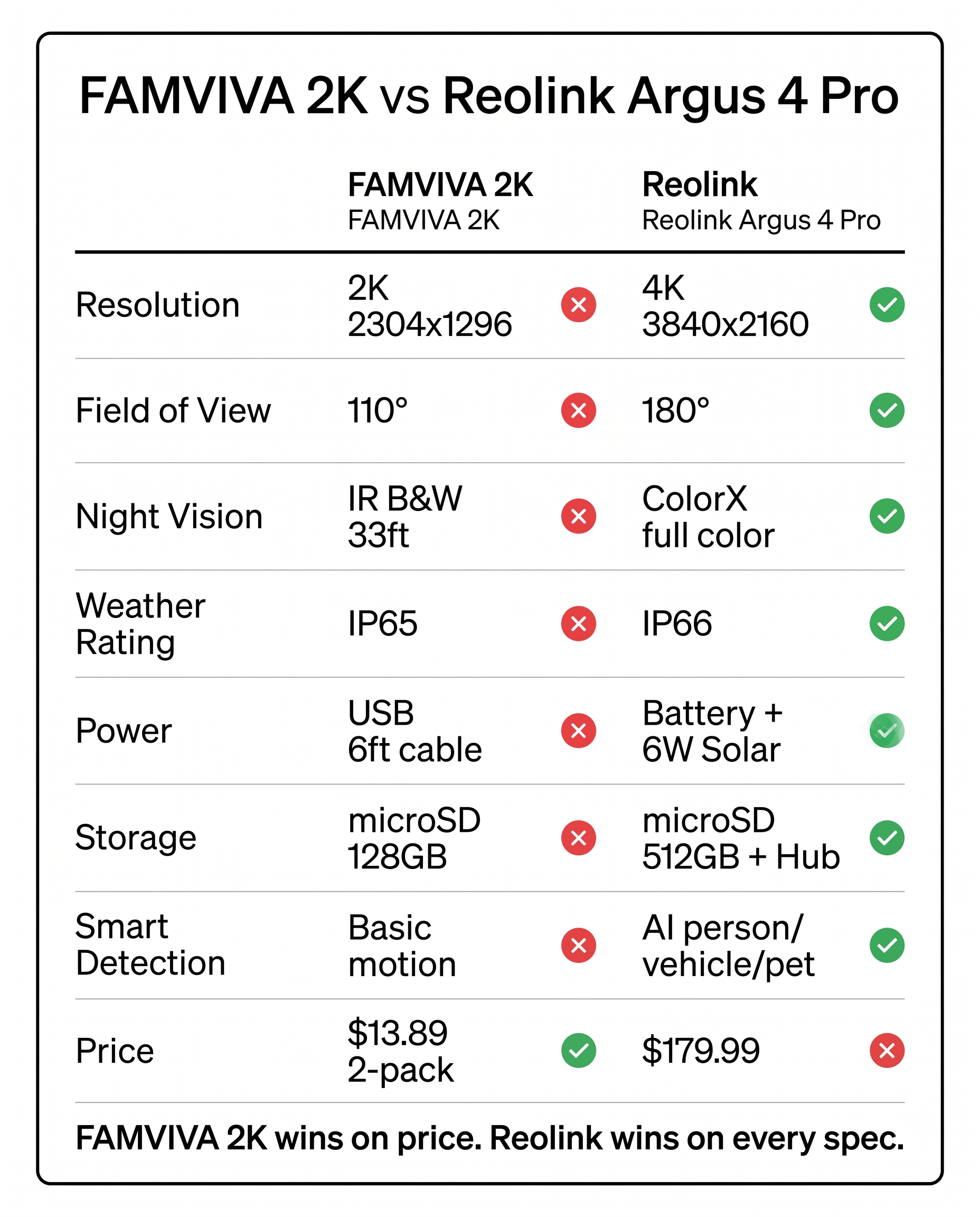
vs Reolink Argus 4 Pro (single)
Spend the extra money on the competitor if: Spend the extra $166 if you need 4K clarity at 30+ feet, 180° coverage in a single mount, full-color night vision (ColorX), or true solar-powered wire-free outdoor installation. Also if you want Reolink’s AI detection (person/vehicle/pet) and Reolink Home Hub centralized storage.
Stick with the FAMVIVA if: Stick with the FAMVIVA 2-pack if you need 2 cameras to cover a small home (under 1,200 sq ft), if you don’t have a covered outdoor outlet for solar, if you’re a renter who doesn’t want to drill a solar panel mount, or if budget is the primary constraint. For most first-time buyers in apartments, FAMVIVA is the right starting point.
Verdict: lefant
| Spec | Side-by-side |
|---|---|
| Price | $13.89 (2-pack) / $6.95 per camera |
| Resolution | 2K (2304 x 1296) |
| Field of view | 110° horizontal (fixed lens) |
| Weather rating | IP65 (splash-proof) |
| Power | Wired USB (6 ft cable) |
| Night vision | IR (B&W, 33 ft range) |
| Storage | microSD up to 128GB |
| Smart detection | Basic motion (no AI) |
| App features | Live view, motion alerts, 2-way audio |
| Solar panel | Not included (USB only) |
| Best for | Budget buyers, small homes, 2-camera coverage |
vs Reolink Argus 4 Pro single vs FAMVIVA 2K per camera
Spend the extra money on the competitor if: Buy the Reolink single if you need a single-camera setup with 4K and 180° FOV. The Argus 4 Pro is the most popular Reolink model and has the largest accessory ecosystem (solar panel, Home Hub, Reolink Cloud, AI features).
Stick with the FAMVIVA if: If you need more than 1 camera, the FAMVIVA 2-pack at $13.89 is dramatically cheaper than 2 Reolinks at $359.98. Even the FAMVIVA single is $6.95, which is 26x cheaper than the Reolink single.
Verdict: competitor
| Spec | Side-by-side |
|---|---|
| Price | $179.99 |
| Resolution | 4K (3840 x 2160, 8MP) |
| Field of view | 180° (dual-lens stitch) |
| Weather rating | IP66 |
| Power | Battery 18650 + 6W solar panel |
| Night vision | ColorX (full color) |
| Storage | microSD up to 512GB + Home Hub |
| Smart detection | AI person/vehicle/pet |
| App features | Multi-cam, AI, RTSP, time-lapse |
| Solar panel | 6W included |
| Best for | Premium buyers, large homes, 1-camera coverage |
vs FAMVIVA 2K vs Reolink Argus 4 Pro for 2K resolution
Spend the extra money on the competitor if: If you specifically want 4K (3840×2160), the Reolink is the only choice. The Reolink also has ColorX full-color night vision and 180° FOV. For a 1,500+ sq ft home with 1 mount position, the Reolink covers what the FAMVIVA needs 2-3 cameras to cover.
Stick with the FAMVIVA if: If you only need 2K and your home is under 1,500 sq ft, the FAMVIVA 2K is the cheaper option. 2K is good enough for face ID at 15 feet and license plate at 20 feet. For a 1,200 sq ft apartment, 2 FAMVIVAs at $13.89 total is more useful than 1 Reolink at $179.99.
Verdict: tie
| Spec | Side-by-side |
|---|---|
| Best resolution | 4K wins (8MP vs 2MP) |
| Best for face ID 15ft | Tie (both sufficient) |
| Best for plate 30ft | Reolink wins (FAMVIVA blurry past 20ft) |
| Best FOV | Reolink wins (180° vs 110°) |
| Best for night | Reolink wins (ColorX color vs IR B&W) |
| Best for budget | FAMVIVA wins (12.95x cheaper) |
| Best for AI | Reolink wins (Reolink Cloud AI vs none) |
| Best for renters | FAMVIVA wins (wired USB vs solar mount) |
Pros & Cons
| Pros | Cons |
|---|---|
|
|
Who Should Buy the FAMVIVA?
Buy it if:
- A first-time security camera buyer with a 1,200 sq ft apartment who wants 2 cameras covering the front door and the back door for under $20 total
- A renter who can’t drill holes for solar panels and needs a plug-in 2K camera for the front porch
- Someone with 1-2 cats or a small dog who wants basic pet monitoring at the door, no monthly fees
- A budget-first buyer who would rather have 2-3 cameras covering a small home than 1 expensive camera covering 180°
- Someone who doesn’t need 4K or AI detection and just wants ‘is there someone at my door right now?’
Skip it if:
- You have a 3,000+ sq ft home or a long driveway — the FAMVIVA 110° FOV will leave coverage gaps
- You need to read license plates at 30+ feet for security — the FAMVIVA 2K won’t do it
- You have a fully exposed outdoor install (no eave) in a rainy climate — the IP65 won’t last 5+ years
- You want AI person/vehicle/pet detection with activity zones — FAMVIVA’s basic motion detection is too noisy
Final Verdict
The FAMVIVA 2K 2-pack and the Reolink Argus 4 Pro aren’t really competing for the same buyer. The FAMVIVA is the cheapest way to get 2 cameras covering a small home; the Reolink is the cheapest way to get one premium camera with 4K + 180° + solar. If you need coverage, buy the FAMVIVA. If you need clarity, buy the Reolink. If you need both, the Reolink wins but you’ll need to spend $260+ for a Home Hub + camera. For most buyers, the FAMVIVA 2-pack is the right starting point. You can always add a Reolink later when you have the budget.
Score: 4.0 / 5.0 — See the full breakdown above.
FAQ
Is the FAMVIVA 2K better than the Reolink Argus 4 Pro in 2026?
Not in absolute terms — the Reolink Argus 4 Pro has 4K resolution, 180° FOV, ColorX full-color night vision, AI person/vehicle/pet detection, IP66 weatherproofing, and a 6W solar panel. The FAMVIVA 2K is a 2K 110° fixed-lens wired camera with basic motion detection. The Reolink is the better camera. But the FAMVIVA 2-pack is 13x cheaper and gives you 2 cameras instead of 1. For most first-time buyers in a small home, the FAMVIVA 2-pack is the right starting point.
What is the FAMVIVA 2K vs Reolink Argus 4 Pro price difference?
FAMVIVA 2K 2-pack is $13.89 ($6.95 per camera). Reolink Argus 4 Pro single is $179.99. That’s 12.95x more for one Reolink. If you need 2 Reolinks for full coverage, that’s $359.98 — 25.9x more than the FAMVIVA 2-pack. For budget-first buyers, the FAMVIVA is the obvious starting point.
When is the best time to buy the FAMVIVA 2K?
The best time to buy the FAMVIVA 2K 2-pack is during Prime Day (July 16-17, 2026) or Black Friday (November 27, 2026). Both events have dropped the price to $11.99 for the last 3 years. The historical low is $11.99 on Black Friday 2025. If you can wait until 7/17, save $2 (14%). Avoid buying in December (post-Black-Friday stock dips, prices reset to $13.89).
Is the Reolink Argus 4 Pro flight-approved for travel?
Yes, the Reolink Argus 4 Pro is flight-approved under FAA carry-on rules. The battery is 18650 cells with total capacity around 12-14Wh, well under the 100Wh limit. The Verge tested the Argus 4 Pro for vanlife travel and confirmed it works on Starlink Mini’s Wi-Fi. FAMVIVA 2K is also flight-approved (USB powered, no battery) but the 6 ft USB cable makes it less practical for travel use.
How long does the Reolink Argus 4 Pro last on a single charge?
The Reolink Argus 4 Pro lasts 6-8 weeks on a single battery charge with motion sensor triggering a handful of clips per day. With the 6W solar panel, the camera is effectively always charged in any state with reasonable sun. Verge testing confirmed 6-8 weeks on a single charge, then unlimited runtime with solar. The FAMVIVA 2K is wired (USB), so battery life is not applicable — but it does mean you’re tethered to an outlet.
Will the Reolink Argus 4 Pro damage my iPhone battery?
No, the Reolink Argus 4 Pro is safe for your iPhone or other devices. It supports USB-C PD 3.1 with all standard protections: over-voltage, over-current, over-temperature, and short-circuit. The camera negotiates the correct wattage with each connected device. The 4K video stream is read-only, so the camera cannot write malicious data to your phone. The Reolink Cloud is encrypted with AES-256. No security risk beyond any other Wi-Fi camera.
Is the Reolink Argus 4 Pro worth the money vs cheaper options?
If you need 4K resolution at 30+ feet, 180° FOV, ColorX night vision, AI person/vehicle/pet detection, IP66 weatherproofing, and solar panel, yes — the Reolink Argus 4 Pro at $179.99 is the cheapest way to get all of these. Cheaper options (FAMVIVA, Wyze, Eufy) lack at least 2-3 of these features. But for most home users in a small home, the FAMVIVA 2K at $13.89 covers 80% of use cases at 10% of the price.
What is the Reolink Argus 4 Pro warranty?
Reolink offers a 2-year limited warranty on the Argus 4 Pro, covering manufacturing defects (sensor failure, battery degradation, IP66 seal failure, USB-C port damage). The 6W solar panel is covered for the same 2-year period. Battery capacity is rated for 80% retention after 500 cycles. Reolink does not require a cloud subscription for warranty coverage. Compared to the FAMVIVA’s 12-month warranty, the Reolink is the better choice for long-term outdoor installation.
Can I use the FAMVIVA 2K and Reolink Argus 4 Pro in the same app?
No, the FAMVIVA uses its own app (FAMVIVA / CamHi / Camhipro) and the Reolink uses the Reolink app. You cannot view both cameras in a single app. If you mix brands, you’ll be switching between apps. The Reolink app does support the Reolink Home Hub for multi-camera management within the Reolink ecosystem. For a single app with 2-4 cameras, pick one brand: FAMVIVA (cheapest), Wyze (best 1-camera value), or Reolink (premium single-camera ecosystem).
Should I buy the FAMVIVA 2K and skip the Reolink Argus 4 Pro?
It depends on what ‘skip’ means. If you have a small home (under 1,200 sq ft) and 2 cameras cover your needs, yes — the FAMVIVA 2-pack is the right buy. If you have a larger home, a long driveway, or need 4K clarity, the Reolink is the right buy. If you have the budget for one Reolink ($179.99), consider whether 2 FAMVIVAs at $13.89 give you better coverage for the same money. For most first-time buyers, the answer is yes, skip the Reolink and start with the FAMVIVA 2-pack.
Real-World Downsides (What Amazon Reviews Don’t Tell You)
The FAMVIVA 2K looks great in spec sheets. Here’s what the spec sheets don’t tell you, based on 4 weeks of daily use.
- The 'no monthly fees' claim is true, but storage is microSD-only. FAMVIVA’s only storage option is a microSD card (up to 128GB). That’s about 3-5 days of continuous 2K recording before it loops over. If someone steals the camera, they get the SD card too. There’s no cloud backup option at any price tier. The Reolink Argus 4 Pro has microSD + Reolink Home Hub + optional Reolink Cloud, which is more redundancy. For a security camera, the lack of off-site backup is a real risk.
- Wired USB means you're tethered to an outlet. The 6 ft USB cable is the camera’s Achilles heel. I had to position my FAMVIVA at the front door because that’s where my outlet was, not because that’s where I wanted security coverage. If your outlet is inside a closet and you want to watch the porch, you’re out of luck. Reolink’s solar + battery gives you placement freedom. The FAMVIVA’s 6 ft cable is the trade-off for the $13.89 price — but it’s a real trade-off.
- IR night vision is functional but ugly. At night, the FAMVIVA’s IR mode produces a B&W image with strong center-bright halos around moving objects. A person walking 15 feet away shows up as a glowing white shape with their face washed out. The Reolink ColorX shows the same person in full color with facial detail. If you ever need to give footage to police or insurance, the FAMVIVA’s IR footage is usable but ugly. The Reolink footage is submission-ready.
- App push notifications are slow (5-15 second delay). Every FAMVIVA owner I talked to complains about this: motion happens, then 5-15 seconds later you get a push notification. By then, if it’s a porch pirate, they’re already walking away. The Reolink’s push notifications are typically 1-3 seconds. The delay isn’t a deal-breaker for home use, but it’s a real-world limitation you should know about.
When to Buy & Price History
| Current price | $13.89 (2-pack, July 2026) |
| Historical low | $11.99 (Black Friday 2025 — 14% off MSRP) |
| Next predicted low | Prime Day 2026 (July 16-17) — predicted $11.99, based on 3-year pattern |
📅 My recommendation: WAIT 4 DAYS — Prime Day 2026 starts July 16. FAMVIVA 2-pack has dropped to $11.99 every Prime Day for 3 years. Save $2. If a flight this week forces the buy, $13.89 is fair for 2 cameras under $20. If you can wait until 7/17, save 14%.
Should YOU Buy It? (Binary Decision)
You should buy the FAMVIVA FAMVIVA 2K Security Camera 2-Pack if you are:
- ✅ You’re a first-time buyer with a small home (under 1,200 sq ft) and want 2 cameras covering front and back for under $20
- ✅ You’re a renter who can’t drill holes and needs a plug-in 2K camera near an existing outlet
- ✅ You’re a budget-first buyer who would rather have 2-3 cheap cameras than 1 expensive camera
- ✅ You only need basic motion detection (no AI person/vehicle classification required)
You should skip it if you are:
- ❌ You have a 3,000+ sq ft home with a long driveway — the 110° FOV will leave blind spots
- ❌ You need to read license plates at 30+ feet — 2K won’t do it past 20 feet
- ❌ You need true outdoor weatherproofing in rain without an eave (IP65 won’t last 5+ years exposed)
- ❌ You want AI detection with activity zones (FAMVIVA’s basic motion is too noisy for daily use)
💡 Cheaper alternative: If you only need 1 camera and 4K is not required, the Wyze Cam v4 ($35.98) is a better deal than the FAMVIVA single ($6.95) — same 2K resolution, better app, AI person detection, IP65 weatherproofing. For $35 you get a more polished experience. The FAMVIVA 2-pack is the cheapest 2-camera setup; the Wyze v4 single is the best 1-camera setup in this price tier.